PixiJS Introduction
PixiJS#
- HTML5 Creation Engine
- Lightweight 2D JavaScript library
- Supports both Canvas API and WebGL (since version 5 it's only WebGL)
- Full scene graph, sprite sheets, filters, shaders
- Similar to PhaserJS game engine (yet it's way faster)
- Ideal for simple games and rapid prototyping
Links#
Architecture#
Namespaces#
- this is just a subset, there are over 500 classes
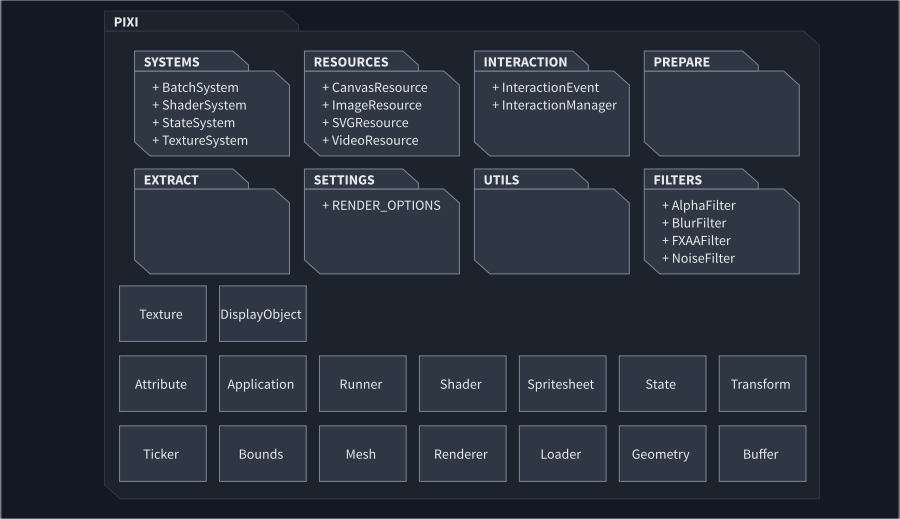
- systems - individual components of the rendering pipeline
- resources - resources used by BaseTexture to handle different media types
- interaction - handling of input events (keyboard, mouse, touch)
- prepare - asynchronous preparation of the rendering pipeline
- extract - rendering-specific functions for exporting content
- settings - customizable globals (default resolution, framerate,...)
- utils - generalized utilities
- filters - WebGL-only display filters
Classes#
- Application - PIXI entry class, should be extended
- Runner - alternative to signals, good for dispatching messages to many objects every frame
- State - WebGL state
- Transform - Transformation entity
- Ticker - Update loop
- Loader - resource loader
- Shader - helper class for GPU shaders
- Spritesheet - utility class for maintaining reference to a collection of textures
Display Entities#
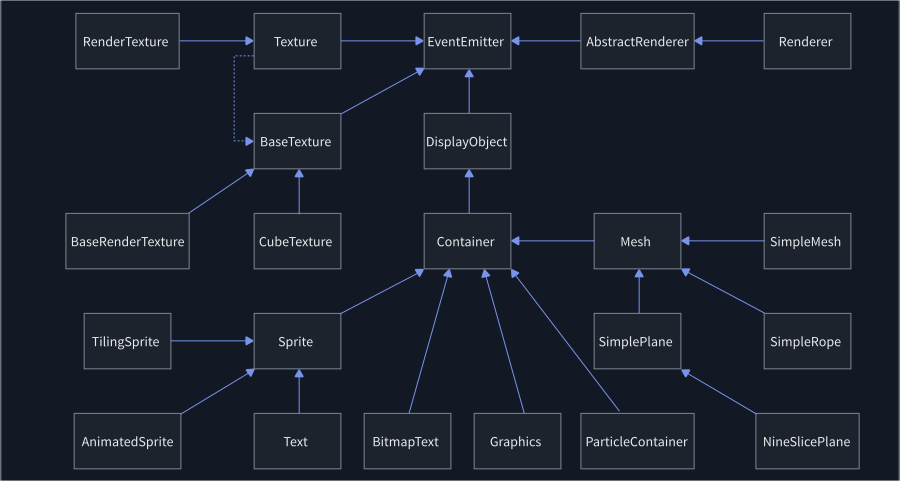
- EventEmitter - high-performance event emitter, similar to the default NodeJS emitter
- DisplayObject - base class of all renderable objects
- Container - a collection of displayable objects
- Mesh - base mesh for rendering any WebGL visuals
- Sprite - base class of all textured objects
- Graphics - class for drawing primitive shapes (lines, circles, rectangles)
- ParticleContainer - very fast version of the Container for drawing lots of sprites
- BitmapText - very fast bitmap text renderer (textures are preloaded)
- Renderer - class that draw the scene onto a WebGL canvas
- BaseTexture - wrapper for texture images
- BaseRenderTexture - special texture that allows any object to be rendered to it
- CubeTexture - image/canvas/video/svg texture
- Texture - BaseTexture with metadata
- RenderTexture - RenderTexture with metadata
DisplayObject#
- members
- alpha, angle, buttonMode, cursor, filters, hitArea, interactive, localTransform, name, parent, pivot, position, renderable, rotation, scale, skew, transform, visible, worldAlpha, worldTransform, worldVisible, x,y, zIndex
- methods
- destroy, getBounds, getGlobalPosition, getLocalBounds, render, setParent, setTransform, toGlobal, toLocal, updateTransform
- events
- added, click, mousedown, mousemove, mouseout, mouseover, mouseup, removed, tap, touchcancel, touchend, touchmove, touchstart
Interesting Plugins#
- pixi-filters - collection of custom display filters
- pixi-compressed-textures - compressed textures for retina displays
- pixi-ui - simple user interface (still WIP)
- pixi-particles - advanced particle system with an editor
- pixi-sound - WebAudio API playback library
- pixi-viewport - highly configurable camera viewport
- PixiTweener - simple tweener for animations
- pixi5-dragonbones - plugin for dragonbone animations
- pixi5-svg - svg support
- pixi-after-effects - support for After-Effects animations
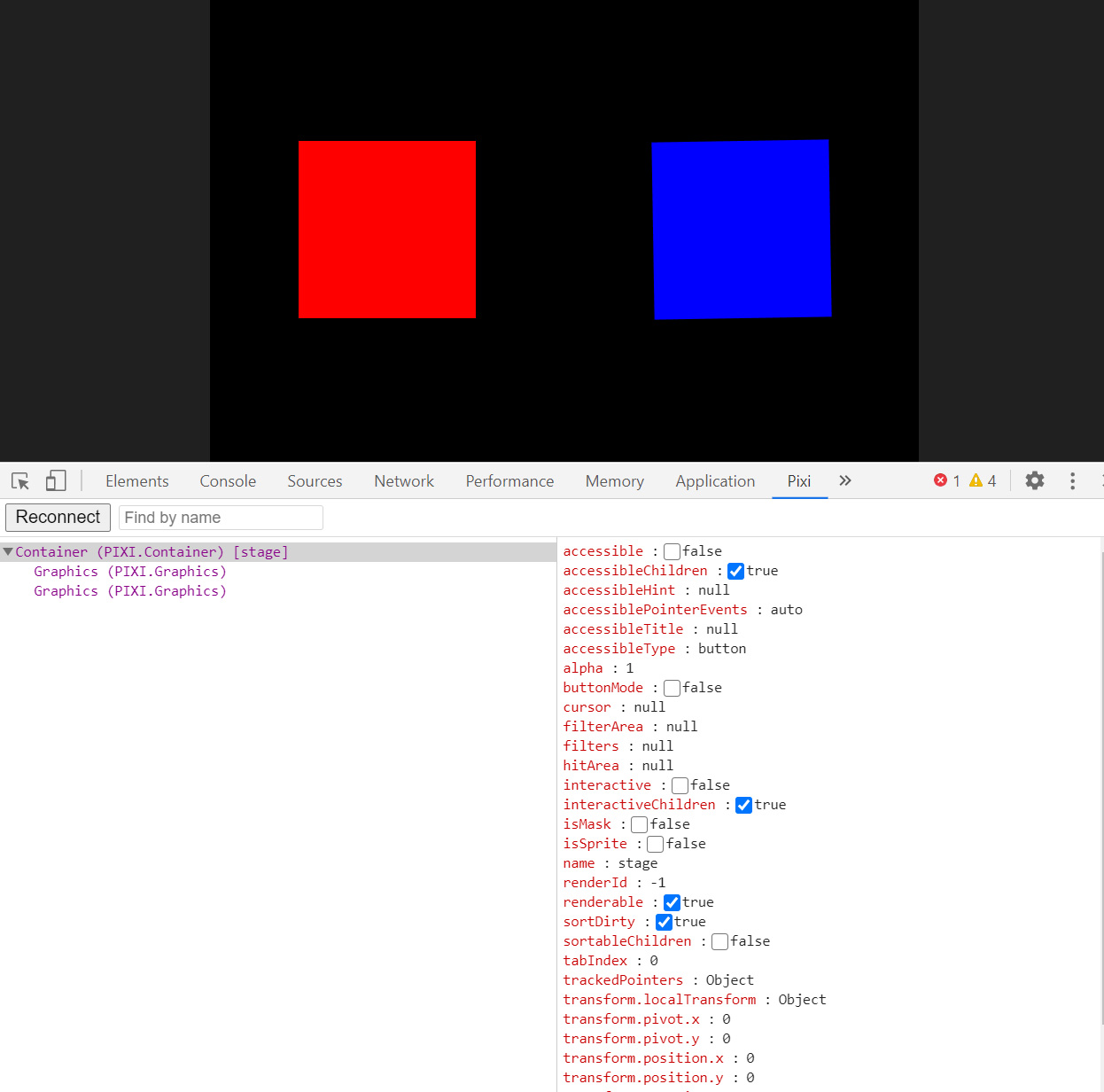
- pixi-inspector - Chrome DevTools for inspecting scene
- SpritesheetGenerator - spritesheet generator
DevTools#
- you can use PixiJS devtools to debug and modify your PIXIJs scene
Basic setup#
import * as PIXI from "pixi.js"; export default class MyPixiApp extends PIXI.Application { constructor(view: HTMLCanvasElement) { super({ view }); this.ticker.add(deltaTime => this.update(deltaTime)); } update(deltaTime: number) { // game loop }}- it's recommended to create a new class and extend
PIXI.Application - the only mandatory parameter is the
viewentity, which should be a HTML canvas
Other attributes#
autoStart: boolean, // automatically starts the game loop width: number, // width of the canvas element (in px) height: number, // height of the canvas element (in px) view: HTMLCanvasElement, // link to the canvas transparent: boolean, // if true, the canvas will be transparent autoDensity: boolean, // whether CSS dimensions should be resized to screen dim. antialias: boolean, // sets anti-aliasing preserveDrawingBuffer: boolean, // if true, preserves stencil buffer resolution: number, // global scale of the screen (default is 1) forceCanvas: boolean, // prevents selection of WebGL backgroundColor: number, // background color of the canvas clearBeforeRender: boolean, // if true, clears the canvas before next render cycle forceFXAA: boolean, // forces FXAA anti-aliasing powerPreference: string, // WebGL parameter for devices with more than one GPU sharedTicker: boolean, // if true, uses global ticker for updates sharedLoader: boolean, // if true, uses global loader resizeTo: Window | HTMLElement, // resizes to a custom HTML elementUpdate loop#
- option 1: by using PIXI internal ticker
let ticker = this.ticker;// prevents autostartticker.autoStart = false;// stops the tickerticker.stop();// starts the ticker if autoStart is falseticker.start();// here we can register our update methodticker.add(delta => this.ourUpdateMethod(delta));- option 2: by using animation frame of the JavaScript engine
ticker.autoStart = false;ticker.stop();let myUpdateLoop =(time) => { ticker.update(time); this.renderer.render(this.stage); requestAnimationFrame(myUpdateLoop);}myUpdateLoop(performance.now());Loading#
- Loader is responsible for asynchronous loading of assets (fonts, images, sounds, spritesheets)
let loader = this.loader;// Chainable `add` to enqueue a resourceloader.add('mySprite', 'data/sprite.png') // first parameter is an alias .add('spritesheet', 'assets/spritesheet.json') .add('bitmapFont', 'assets/score.fnt'); // loading is asynchronous !!loader.load((loader, resources) => { // init the rest of the game and run the ticker}); // loader eventsloader.onProgress.add(() => {}); // called once per loaded/errored fileloader.onError.add(() => {}); // called once per errored fileloader.onLoad.add(() => {}); // called once per loaded fileloader.onComplete.add(() => {}); // called once when the queued resources all loadPositioning#
- position, rotation, scale, zIndex
- rotation - rotation in radians
- pivot - origin of the object in px (rotation is always around the origin
- anchor - relative origin of the object (only for Sprites
- the scale of the parent affects the units of its children (common behavior of all gfx libraries)
- pivot is not affected by the scale, it always takes into account the size of the object in px
- stage is the root element of the scene graph
- getBounds() - retrieves the bounds of the object, can be used to check where the object is
- toGlobal() - calculates the global position
- toLocal() - calculates the local position relative to another point
Exercises#
- all exercises are relevant to a project version with a tag of 4.2
Primitive shapes#
- go to
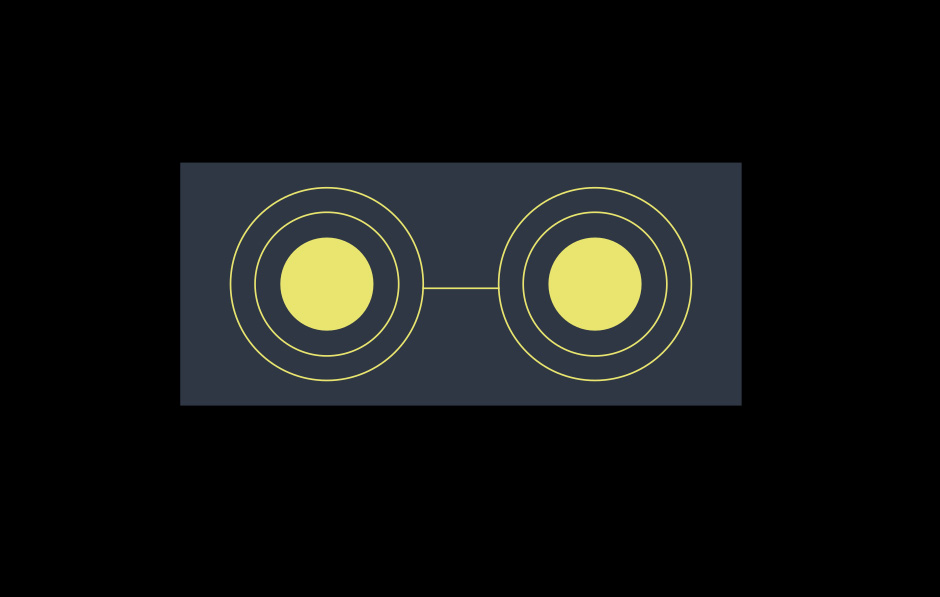
examples/src/02-pixi-intro/primitives.ts - follow the instructions in the TODO block and draw the picture below
- you can access the canvas in
http://localhost:1234/02_primitives.html
Text#
- go to
examples/src/02-pixi-intro/text.ts - follow the instructions in the TODO block and draw an animated text
- you can access the canvas in
http://localhost:1234/02_text.html

Particles#
- go to
examples/src/02-pixi-intro/particles.ts - follow the instructions in the TODO block and create rotating particles
- you can access the canvas in
http://localhost:1234/02_particles.html
Sound#
- go to
examples/src/02-pixi-intro/sound.ts - follow the instructions in the TODO block and play a sound when you click on the sprite
- you can access the canvas in
http://localhost:1234/02_sound.html